Chrome Extension

Learn Languages
While Watching Netflix

Netflix Dual Subtitles Master displays dual subtitles and an AI-powered language assistant while you watch, dramatically improving your language learning efficiency.

55+ languages
AI-powered assistant
Any Netflix content
What You Get

Features

Dual subtitles, AI assistant, and keyboard shortcuts — everything you need for effortless language learning on Netflix.

netflix.com
Dual Subtitles Feature
Feature 01

Dual Subtitle Display

  • Simultaneously display the original language subtitles and your native language subtitles.
  • Select from 55+ language options, including languages not offered by Netflix.
  • Available for any Netflix content — not just English programmes.
  • Two subtitle modes: AI-translated or Netflix-provided subtitles.
  • Toggle ON/OFF with a single on-screen button, with automatic optimal positioning.

Feature 02

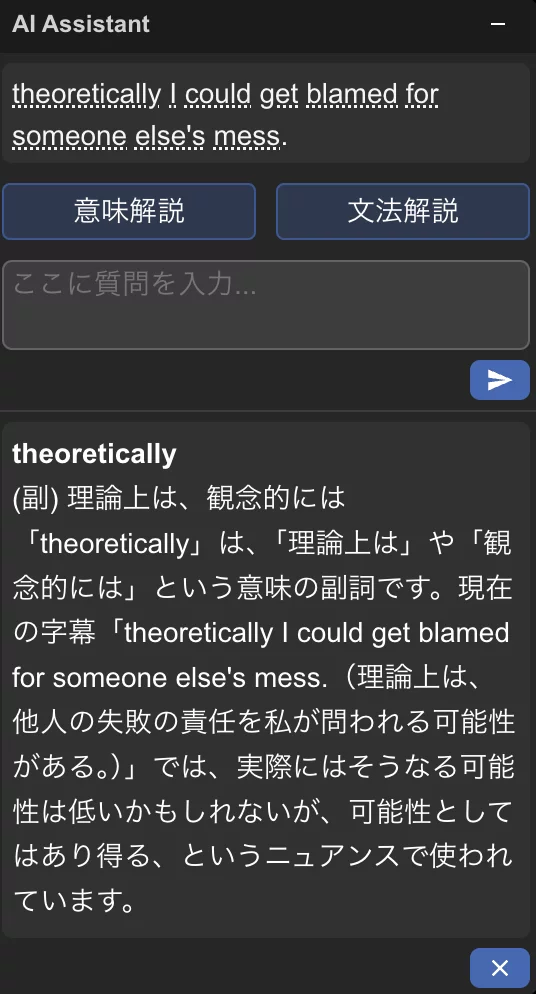
AI Language Assistant

An intelligent side panel available while watching, with four powerful learning tools:

📖 Word Dictionary

Instantly check the meaning of unfamiliar words.

💬 Meaning Explanation

Understand context and nuances of subtitles.

📝 Grammar Explanation

Resolve grammar questions on the spot.

🤖 Free Questions

AI immediately answers any language question.

AI Language Assistant

Subtitle Control Keys

A

Previous

subtitle

S

Repeat

current

D

Next

subtitle

subtitle timeline
Previous
Current →
Next
Feature 03

Keyboard Shortcuts

Control your learning pace comfortably with a single touch. No need to reach for the mouse.

  • A
    Previous Subtitle
    Jump back to replay the previous line.
  • S
    Repeat Current
    Replay the current subtitle as many times as needed.
  • D
    Next Subtitle
    Skip ahead to the next line instantly.

Ready to start learning?

Install Netflix Dual Subtitles Master today and transform your Netflix time into effective language learning sessions.

Add to Chrome — Free Trial

Available on Chrome Web Store · Free trial included

Subscription

Manage Your Subscription

View subscription status, invoices, and billing details by logging in with your Google account through our subscription portal.

Open Subscription Portal

Requires Google account sign-in

Legal Information